Fake MoonX PnL: a share image with your coin and size
 · 3 min read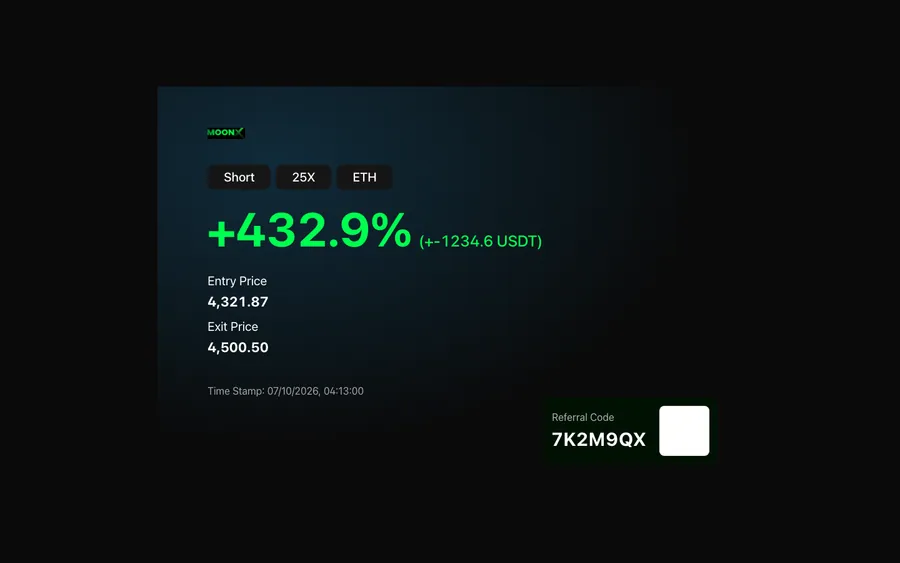
What you get with the fake MoonX card
The fake MoonX PnL card is built for speed. It has one main screen, a PnL card you can customize.
- PnL card
- Your coin and size
- Ready to post
Choose the coin, enter the size and the result, and the card is built around them. When it looks right, save the share image. There is no account, no sign-in to a platform and nothing to connect.
Where a quick card fits
A card is the fastest prop in the trading set. It slots into a story post, a group-chat screenshot inside a skit, or a phone held in a film scene. It is also a good opening frame: show the card, then explain what really happened.
The best use is as a setup for a joke. The card says one thing and the next shot says another. A parody of the confident post-trade screenshot, followed by a character sitting very still, is a reliable structure. For a view across all the exchange styles, see fake PnL cards for every exchange.
Build it in a minute
- 1Open MoonX in MaxLarp.
- 2Pick the coin and type in the position size.
- 3Enter the result, then check the preview for consistency.
- 4Save the share image and place it in your video, your story or your mock-up.
Details worth a second look
- Read the preview as a stranger would. If the percentage looks off for the size, change it.
- Match the card to your persona. A character who owns a dashboard full of small bets should not post a massive win without a reason.
- Run a few cards with different coins and results to build a believable feed.
- Write a caption that signals a joke or a story.
Keep a note of the figures you used. If a later scene refers back to this trade, the numbers should match exactly, down to the last digit.
Editing the card into a video
Once you have the share image, the edit decides how it lands. Place the MoonX card on a phone mock-up, or on a plain background with space for a caption. Keep the background simple so the numbers stay readable, even on a small screen.
A good pattern is the reverse reveal: open on a character looking pleased, cut to the card, then cut back to the character's face as reality sinks in. Another is the group-chat screenshot, where the card appears in a thread and the replies do the comedy.
Export at the size your platform wants: vertical for stories, square for a feed, wide for a video insert. Check how the image looks at thumbnail size before you post. If the coin and the result are not legible at that scale, make the card bigger in the frame.
If you plan more than one video, save a template of your layout, caption position and font so the series looks consistent. Consistency makes small changes in the card easier to spot and makes the feed feel like a character's real timeline.
Pairs well with
Use the card as the first beat, then show where the money went. A fake Axiom PnL card adds another visual style, a fake Phantom wallet shows the balance, and a fake Coinbase dashboard covers the cash-out. A Lamborghini order tracker is the classic final scene.
Open MoonX

Questions
Is the fake MoonX PnL card connected to a real account?
No. Nothing connects to a real account or exchange. The coin, size and result come only from what you type in. MaxLarp is not affiliated with, endorsed by or sponsored by MoonX.
Can I use my own coin and size?
Yes. You choose the coin and the position size, and the card is built from your choices. Review the preview so the numbers agree before you save.
Can I use it to show followers I am profitable?
No. Using a fake card as proof of results to sell signals, courses, copy-trading or funded accounts is deception and not allowed. Use it for memes, skits and films.
What format is the result?
A downloadable share image that is ready to post. You can use it in a video edit, a story or a phone mock-up, and create more versions with different coins and sizes.
Every number on MaxLarp is fictional. Not affiliated with any brand shown. Acceptable use